
Want animated Instagram Reels and YouTube Shorts without filming, editing software or paid video tools? With the free open-source claude-animation-skills repo, Claude Code becomes your animation studio. The best part: you don't install anything yourself. Copy one prompt, paste it into Claude, and Claude sets up all 10 animation skills for you. A second prompt makes your first video.
What are Claude animation skills?
Claude Code is Anthropic's AI agent that can work on your computer: it reads files, writes code and runs programs. A skill is a small instruction pack that teaches Claude one job. Once a skill is installed, it becomes a slash command. For example, the graph skill becomes /graph, and typing /graph 0 to 100K followers in 9 months gives you a finished animated video.
- No footage needed. Every frame is drawn in code.
- Free and local. Videos render on your own computer, with no paid video API.
- Reels-ready. Vertical 1080×1920 MP4 at 30 fps, checked against Instagram's safe area so your text isn't hidden.
- Free voiceover. The two story skills can narrate with an offline AI voice.
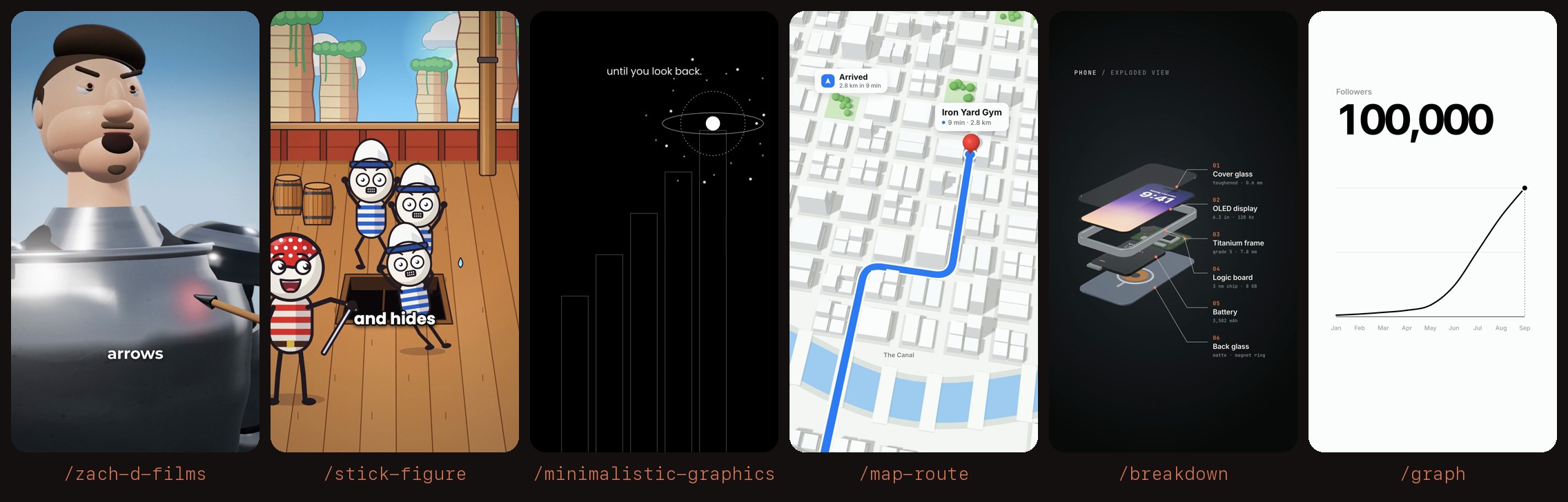
The 10 skills you get
| Command | What it makes | Try it with |
|---|---|---|
/graph | A line graph that draws itself while a big number counts up | 0 to 100K followers in 9 months |
/minimalistic-graphics | Black-and-white line art: a dot climbs hairline steps | Every step feels small until you look back |
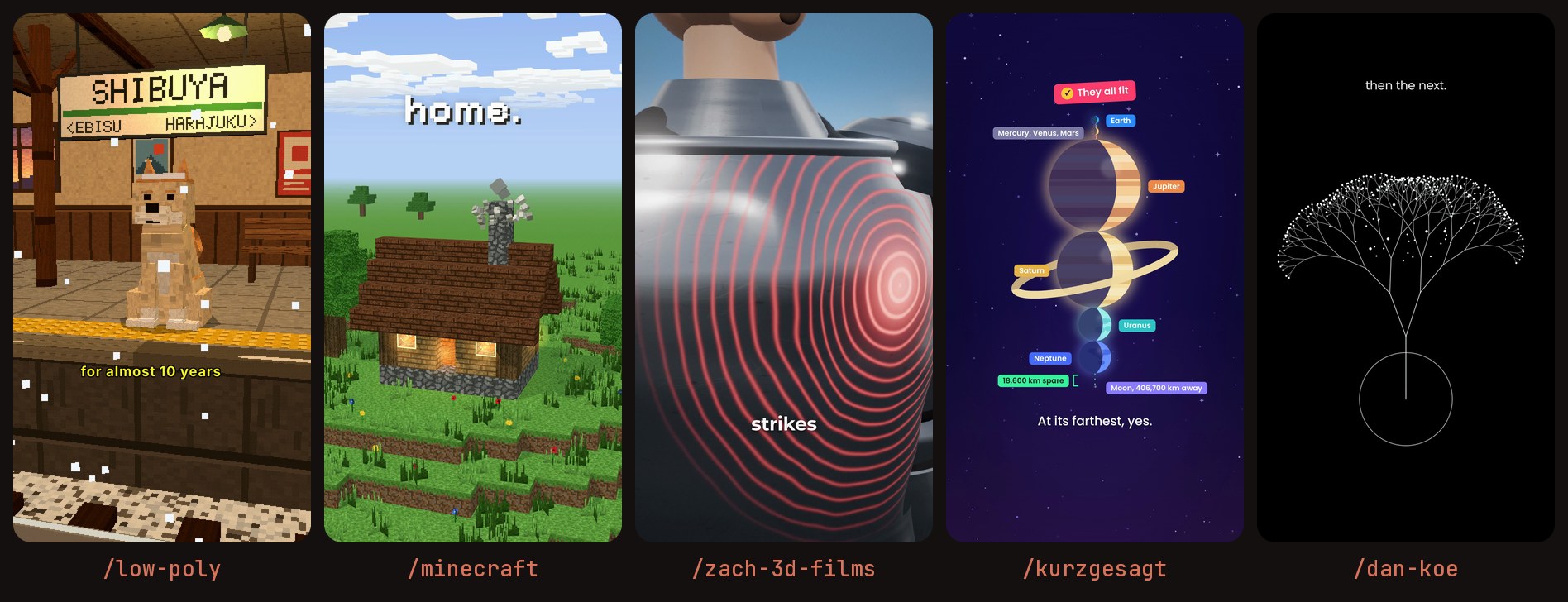
/dan-koe | One dot grows into a branching line tree | One choice, then the next |
/kurzgesagt | Flat-vector space scene with glowing planets | Do all the planets fit between Earth and the Moon? |
/map-route | 3D city map with a self-drawing route and ETA | Home to the gym, 2.8 km |
/breakdown | 3D exploded view of a phone with labelled parts | My phone, every part labelled |
/low-poly | Retro PS1-style low-poly 3D story | The dog who waited at the station for 10 years |
/minecraft | Blocky voxel house that builds itself | Build a tiny cottage block by block |
/stick-figure | Full stick-figure explainer with voice, music and sound effects | Why did pirates wear eye patches? |
/zach-d-films | 3D cartoon "what if" explainer with slow-motion impacts | Could ancient armour stop an arrow? |
How it works (in plain English)
Each skill is a folder with a SKILL.md file (the instructions Claude follows) and an animation template. When you run a command, Claude:
- Plans the video from your sentence and writes a small settings file.
- Animates it with web animation tools (GSAP for 2D, three.js for 3D).
- Renders it frame by frame in a hidden browser and saves an MP4 with ffmpeg.
- Checks a preview sheet of the frames and fixes anything that would be covered by Instagram's buttons, then hands you the video.
Simple skills render in about 10 seconds, 3D ones in a minute or two. The two story skills (/stick-figure and /zach-d-films) also write a script, record an AI voiceover and time captions to it, so they take longer.
Prompt 1: install all 10 skills
Copy this whole prompt, paste it into Claude Code and press Enter. Claude checks your computer (Windows, Mac or Linux), installs whatever is missing, downloads the repo, sets up all 10 skills and tests one. It takes about 10 to 20 minutes, mostly downloads.
Install the 10 animation skills from https://github.com/artemnovitckii/claude-animation-skills
as personal Claude Code skills on this computer, so I can use them as slash commands
(/graph, /minecraft, /zach-d-films and so on) in any future session. Do every step
yourself. I don't want to install or configure anything manually.

1. Detect my operating system (Windows, macOS or Linux) and shell.
2. Check for Node.js 18+ (22+ preferred), Python 3.9+, ffmpeg and git. Install anything
   missing yourself. Prefer a package manager (Homebrew, apt, winget). If that isn't
   possible, download portable official builds into a "tools" folder next to the repo
   and add them to PATH. Never ask me to install something by hand.
3. Download the repo into a permanent folder (git clone, or the GitHub zip if git is
   missing). Use ~/claude-animation-skills on macOS/Linux, or
   %USERPROFILE%\claude-animation-skills on Windows.
4. macOS/Linux: run ./install.sh and then ./install.sh --voice.
   Windows (no bash): do what install.sh and kit/setup.sh do, by hand:
   - Link each folder in skills\ into %USERPROFILE%\.claude\skills\ as a directory
     junction. Also make a junction %USERPROFILE%\.claude\kit pointing to the repo's
     kit folder, because the skills find the kit at ..\..\kit.
   - In kit: npm install, npx playwright install chromium, put gsap.min.js in
     kit\vendor, create kit\.venv with numpy, scipy, soundfile and kokoro-onnx,
     and download the Kokoro model files into kit\models.
   - Fix macOS-only code: in kit/anim.py call npx through shutil.which('npx');
     in skills/zach-d-films/engine/render.mjs build ROOT with fileURLToPath;
     in skills/stick-figure/engine/tools/render.js open the page with pathToFileURL.
5. Skip zach-3d-films (it duplicates zach-d-films). Install the other 10:
   breakdown, dan-koe, graph, kurzgesagt, low-poly, map-route, minecraft,
   minimalistic-graphics, stick-figure, zach-d-films.
6. Test it: build a sample /graph spec, render it, and confirm the MP4 plays and its
   contact sheet looks right. Fix any error you hit and test again.
7. Save a note in your memory with the install folder, the tools folder and the PATH
   or python path the skills need, so future sessions can run them without setup.
8. Finish with a short summary: the 10 commands I can now use, where everything is
   installed, which folders I must never delete, and anything that didn't work.
When Claude finishes, start a new Claude Code session and type /. You'll see all 10 skills in the menu.
Prompt 2: create a sample video
In the new session, paste this prompt. It makes a 10-second YouTube Short with the /minecraft skill, including background music and sound effects:
/minecraft Build a tiny cozy cottage block by block on a grassy hill at sunset.
The chimney slams in last and the windows light up warm yellow.

Make it a finished 10-second vertical short (1080x1920, 30 fps), ready to upload to
YouTube Shorts and Instagram Reels:
- If the animation is shorter than 10 seconds, slow it down smoothly and hold the
  final frame so it lasts exactly 10 seconds.
- Add calm, upbeat background music and soft block-placing "pop" sounds that land on
  the blocks, generated in code (no copyrighted audio).
- Add a short friendly voiceover with the free local voice: "One block at a time,
  you can build anything."
- Keep all text inside Instagram's safe area and check the contact sheet before you
  finish.
Save it as cottage-short.mp4 in my Videos folder and tell me the path.
Claude writes the settings, renders the animation, makes the audio, mixes everything with ffmpeg, checks the result and gives you the file path. Your video is ready to upload.
Bonus: more video ideas and your own skill
More one-line video prompts
/graph my YouTube subscribers: 0.4, 0.9, 1.6, 2.5, 3.8, 5.5, 8, 12, 18, 26, 37, 50 (thousands), Jan to Dec, final 50,000, dark mode
/kurzgesagt do all the planets fit between Earth and the Moon?
/map-route home to the gym, 2.8 km, 9 minutes
/stick-figure why did pirates wear eye patches?
/zach-d-films could ancient armour stop an arrow?
Prompt: create your own new skill
Want a style that isn't in the list? Paste this and change the parts in [brackets]. Claude copies the pattern of an existing skill and installs the new one.
Using the claude-animation-skills repo you installed, create a new animation skill
called [countdown] that follows the same pattern as the graph skill.

It should animate: [a big number counting down from 10 to 0 with a thin ring that
drains each second, then one short reveal line fades up. White on black, no emojis.]

Copy skills/graph, then rewrite SKILL.md (a clear description of when to use it,
steps, the JSON spec and taste rules), build.py (defaults, input checks, duration)
and template.html (keep const SPEC = __SPEC__ and the paused GSAP timeline on
window.__timelines["main"]). Keep text inside Instagram's safe area. Render a test,
check the contact sheet, fix any problems, and install it as /[countdown].
FAQ
Do I need to install anything myself?
No. You only need Claude Code. Prompt 1 tells Claude to install Node.js, Python, ffmpeg, the repo and all 10 skills by itself. You just click Allow when it asks for permission.
Does it work on Windows, Mac and Linux?
Yes. On Mac and Linux, Claude uses the repo's own installer. On Windows, the prompt tells Claude to do the same steps by hand and to fix the few Mac-only paths.
Is it free?
Yes. The repo is MIT licensed, and the rendering, AI voice and caption timing all run on your computer. You only need a Claude plan that includes Claude Code.
Can I use it in the normal Claude chat on the web?
No. Skills that render video need to run programs on your computer, so use Claude Code in the Claude desktop app or a terminal.
What size are the videos?
Vertical 1080×1920 MP4 at 30 fps, which works for Instagram Reels, YouTube Shorts and TikTok.
Conclusion: two copy-paste prompts are all it takes. Prompt 1 gives you 10 animation styles as slash commands, and Prompt 2 turns a single sentence into a finished Short. After that, every new video is one line.
Credits: claude-animation-skills is by Artem Novitckii (MIT). It uses HyperFrames, three.js, GSAP, Playwright, Kokoro and Parakeet. /zach-d-films is named after a style of short and isn't affiliated with Zack D. Films. This article is an independent tutorial.
Post a Comment